Final Paper Preparation
After acceptance, all papers go through a second review by the EDUNINE Program Committee to ensure they meet publication quality standards, follow the correct procedures, and fit the assigned category. If your paper was conditionally accepted (with minor or major revisions), you must improve both the content and language based on reviewer feedback to meet category requirements. To ensure smooth publication in IEEE Xplore, final papers must be converted to PDF using PDF eXpress and submitted along with a copyright transfer agreement to IEEE. High publishing standards are important, so multiple review steps are included. To make the most of this final review, please submit your revised paper well before the deadline, as each review takes time and attention. This section offers a complete guide with clear, step-by-step instructions and helpful tips.
Table of Content
Step 1: Addressing the Reviewers' Recommendations and Revising Your Paper According to IEEE Standards

Getting your final paper ready for submission is an important step to ensure it is accepted and included in the conference proceedings. Make sure to follow the reviewers’ suggestions, meet your paper's category requirements, and follow IEEE standards. Double-check all key parts of your submission. By doing this, you help ensure your paper meets the high-quality standards needed for publication in the IEEE Xplore Digital Library.
1. Incorporating Reviewers' Comments:
Carefully review and incorporate the feedback provided by the reviewers inline with the category of your paper. Although your work has been positively evaluated, the reviewers have identified specific areas for improvement that must be addressed before final acceptance. Whether the improvements are minor or major (accepted with minor or major improvements), they are mandatory to meet the publication's quality standards.
Even if your paper is "clearly accepted", addressing the reviewers' suggestions will enhance its clarity, accuracy, and overall quality. Ensure that you make the required adjustments and submit the revised version for a second review by a Technical Committee member to ensure compliance with IEEE standards.
2. Aligning with Conference and IEEE Education Society Focus:
Ensure that your final paper aligns with the focus of the EDUNINE Conference and the IEEE Education Society. The focus should be on "The theory and practice of Education in Engineering, Computation, Technology, and educational technology involved in the effective delivery of domain knowledge in fields within IEEE's scope of interest".
3. Reviewing Authors' Information and References:
Authors must meticulously verify the accuracy of their paper, including the authors' names, initials, affiliations, and references. These are common sources of errors and should be corrected before submission. Note that no further corrections will be made by the publisher after publication.
4. Adhering to Ethical Guidelines for Scientific Publishing:
Authors must follow IEEE's ethical publishing guidelines, which cover authorship, citation practices, plagiarism prevention, and the publication of original research. Familiarize yourself with IEEE’s publishing ethics: IEEE Author Center, Author Ethics, Ethic Requirements (https://conferences.ieeeauthorcenter.ieee.org/author-ethics/ethical-requirements/).
- i. Authorship Criteria:Ensure that all contributors meet IEEE's authorship criteria, which include making significant intellectual contributions, participating in the drafting or reviewing process, and approving the final version for publication. Contributors who do not meet these criteria should be acknowledged in the Acknowledgment section.
- ii. Citation Practices:Citations are necessary to enhance research
reproducibility. Always cite sources when:
- Directly quoting: Use quotation marks and include a citation.
- Paraphrasing or summarizing: Provide a citation for restating information.
- Using data, research results, or graphics: Cite the original source.
- This also applies to your own prior work—when in doubt, cite.
- iii. Inappropriate Use of Citations:Do not cite irrelevant sources to artificially inflate citation metrics. Only cite sources that directly contribute to your paper.
- iv. Accurate Data Reporting:Maintain the highest standards of data accuracy. Avoid fabrication, falsification, and image manipulation, which are violations of ethical publishing standards.
Step 2: Verifying Originality and Absence of Plagiarism

Plagiarism occurs when someone uses another person’s ideas, words, or work without proper acknowledgment, effectively presenting it as their own. It includes copying text verbatim, paraphrasing without citation, or failing to credit sources. Self-plagiarism, another form of academic misconduct, happens when authors reuse their previously published work in a new submission without proper disclosure or citation.
Plagiarism undermines the integrity of academic research, devalues genuine contributions, and violates ethical standards. To prevent plagiarism, authors must ensure proper citations for all sources and provide originality in their work. Adhering to these principles not only upholds academic honesty but also contributes to the advancement of knowledge in a credible and ethical manner.
1. Publishing Original Research:
Ensure your paper contains original research that has not been published elsewhere and is not under review by any other publication simultaneously (Multiple Submissions). Multiple Submissions: This practice is considered unethical and may lead to suspension from publication in IEEE.
2. IEEE's Plagiarism Policy:
Ensure your final paper is free from plagiarism and self-plagiarism. Many universities use plagiarism detection tools, and these are also available for researchers. IEEE requires all submissions to undergo a plagiarism check with IEEE CrossCheck to verify the originality of submissions.
Plagiarism involves using someone else's ideas, results, or words without attribution. IEEE considers any form of plagiarism as unethical. Before submission, check your paper using a plagiarism detection tool.
If your research evolves over time (e.g., from a work in progress paper to a full paper), you must cite the earlier version and indicate how the later version differs to avoid self-plagiarism.
- i. Similarity Threshold: The overall similarity rate should not exceed
30%, and similarity to any single source should not exceed 10%. Submissions
exceeding these thresholds will trigger a review by the conference chair.
If plagiarism is suspected, IEEE will investigate the matter, with severe academic and professional consequences, including the retraction of your paper and the suspension of your publishing privileges.
3. Understanding Self-Plagiarism and How to Avoid It:
Self-plagiarism refers to the act of reusing substantial portions of your own previously published work without proper citation, presenting it as new and original. While it may seem harmless, self-plagiarism is a serious ethical violation, as it misleads readers and distorts the concept of scholarly advancement. In fact, it is treated with the same severity as plagiarism involving others work. This unethical practice can have significant repercussions, including the rejection of your submission, disqualification from IEEE Xplore®, and even a ban from future IEEE publications. To avoid self-plagiarism:
- i. Acknowledge Prior Work: If you are building on or referencing your own previous research, always ensure that it is properly cited. Clearly indicate how the new submission differs from your earlier work, and remember that reused material should not exceed 10% of the total content.
- ii. Do Not Republish Entire Sections: Avoid using large sections of previously published work without citation. Even if a portion of your prior research is reused, it must be acknowledged and clearly distinguished from the new material in your paper.
- iii. Clarify the Evolution of Your Research: If your current submission builds upon past work, explicitly describe the differences between this new paper and your previous publications. Highlight how your research has advanced or evolved, emphasizing the unique contributions of the current paper.
It is vital to understand that self-plagiarism involves not just text, but also figures, tables, and other materials previously published by you. Reusing these elements without proper disclosure is considered unethical and violates IEEE’s policies.
By maintaining transparency in your citations and ensuring that your work remains genuinely original, you uphold academic integrity and contribute meaningfully to the scientific community. Avoiding both plagiarism and self-plagiarism is essential to maintaining the trust and respect of your peers and ensuring your research is recognized as authentic and valuable.
Step 3: Addressing English Language Issues and Proofreading Your Paper

As the official language of the conference is English, careful attention to linguistic and typographical accuracy is required. Proofread your paper thoroughly to correct spelling, grammar, punctuation, and other errors to meet the conference's language standards.
Although papers are not rejected solely for language deficiencies during peer review, your paper's acceptance is contingent upon improving technical English. Papers accepted with major or minor improvements may undergo multiple reviews before the final paper submission deadline (refer to the Timetable in this page). Failure to meet language standards will result in rejection, and the paper will not proceed for further review in IEEE Xplore®.
For clear communication with a global audience, follow these guidelines for improving technical English:
- Use concise and clear sentences; avoid unnecessary verbosity.
- Simplify overly complex or formal language.
- Define acronyms upon their first usage.
- Organize the paper logically for smooth flow.
If you're struggling with English proficiency, consider seeking help from colleagues with strong English skills or using institutional writing resources. Avoid relying on software translators as they often fail to deliver high-quality prose. If necessary, engage professional proofreading services. IEEE offers discounted rates through agreements with several services—details can be found at the IEEE Author Center .
Step 4: Reviewing Paper Formatting compliance with the IEEE Conference Templates
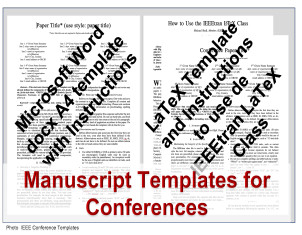
Upon submission, all conference proceedings are automatically converted to HTML and other media by IEEE Xplore® software. Predefined formats and styles are markers for identifying text elements for convertion. Strict compliance with formats and styles is crucial. Non-compliance will prevent the paper to be converted successful to other media formats and from being included in IEEE Xplore®.
Please use the MS-Word template conference-template-a4.docx or the LaTeX template IEEE-conference-template-062824.pdf as visual references for the required format and layout of your paper.
Ensure that your paper adheres to the following:
- Format the paper for A4 printing, using the IEEE Manuscript Templates for Conference Proceedings, which are Xplore®-compliant.
- LaTeX users should use the "conference" option.
- Do not alter template formatting (e.g., margins, line spacing).
- Use predefined styles in the MS-Word template rather than manually adjusting document elements.
- Remove any template text (e.g., footer in MS-Word in the first page XXX-X-XXXX-XXXX-X/XX/$XX.00 ©20XX IEEE).
- Do not include page numbers or headers/footers.
- Follow IEEE style for references and citations.
Conference Paper Requirements:
- Full papers: Maximum 6 pages, including references, figures, tables, and a 150-word abstract.
- Work-in-progress (WIP) papers: Maximum 4 pages, including references, figures, tables, and a 150-word abstract.
- Doctoral Symposium (DS) papers: Maximum 4 pages, including references, figures, tables, and a 150-word abstract.
- Workshop/plenary/panel papers: Abstract of 150 words, up to 6 pages for full papers or 2 pages for short papers.
Papers exceeding the page limit will not be accepted.
Step 5: Verifying Information in EasyChair

Review and update the title, abstract, author names, and affiliations. Ensure accuracy, as this information will be used for author and paper indexing.
The order of authors in the paper should match the one listed in the submission system.
If an author appears in multiple papers, make sure their name is listed consistently across all submissions. In the Conference Proceedings Author Index, each author should appear only once, with all their respective papers grouped under their name.
Step 6: Generate an IEEE Xplore®-compliant PDF of your paper
PDF eXpress is a free service for IEEE conferences that allows authors to create IEEE Xplore-compliant PDFs (conversion function) from DOC /DOCX /LaTeX files or to check self-created PDFs for IEEE Xplore® compatibility (PDF Check function)
PDF eXpress Access Information
Please note that access to PDF eXpress will be available after the Peer-Review Notification date. The conference has to await for the official access link and updated guidelines from IEEE. We will share all necessary information with authors as soon as it becomes available. Thank you for your understanding.
Before creating/checking a PDF file
Proofread your source document thoroughly to confirm that it will require no revision.
IMPORTANT: Any changes made to a PDF after an IEEE PDF eXpress conversion may invalidate IEEE Xplore® compatibility. Please, convert the file again with IEEE PDF eXpress.
Access the PDEeXpress site
Click the link to access: IEEE PDF eXpress site
You'll see the PDFeXpress login screen:
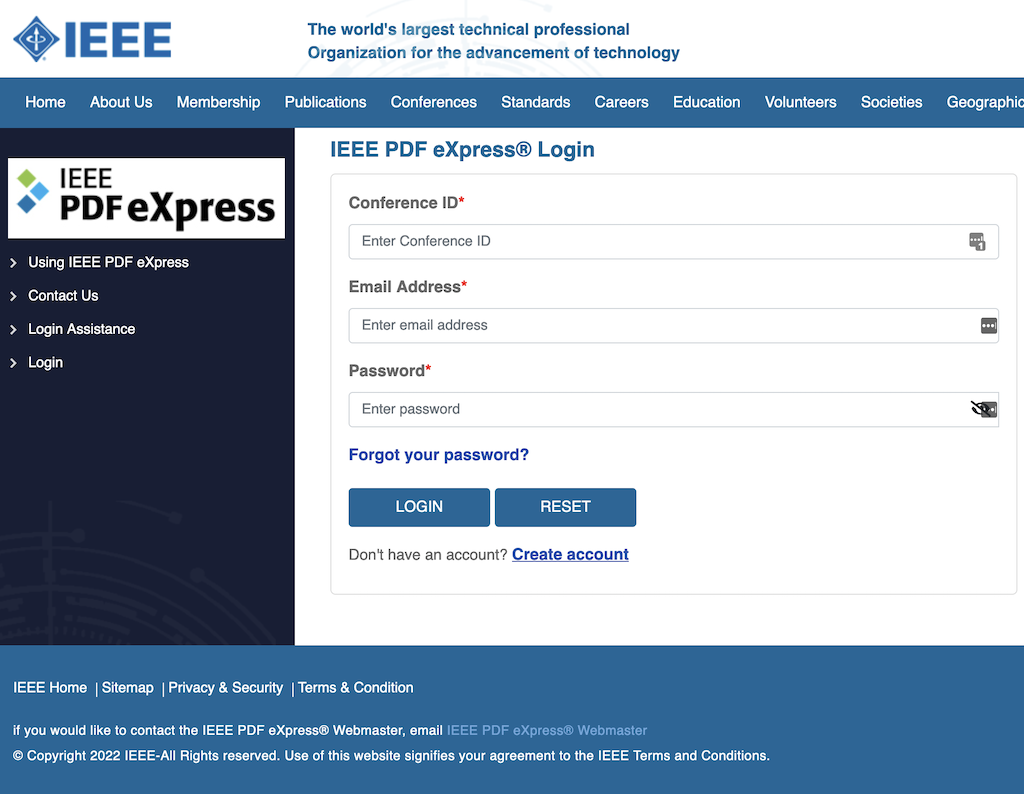
Enter the following information:
- Conference Id: 62390X
- First-time users should do the following:
- Select the Create account link
- Enter information as prompted.
- An online confirmation will be displayed, and an email confirmation will be sent verifying your account setup.
- Select the Create account link
- Previous users of PDF eXpress:
- Email Address: Enter the email address of the previous PDF eXpress use.
- Password: Enter the corresponding password.
- The system prompts you to link this new conference ID to your account, reply YES. The system will show you your profile information and you can update it. Remember to click SUBMIT in each case.
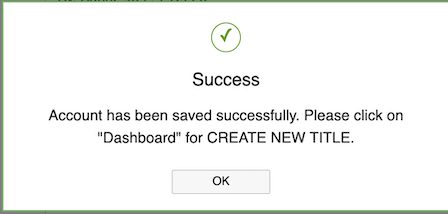
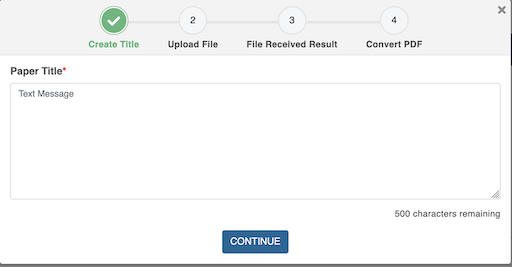
After you log in, you can create a pdf file from a docx or LaTeX file or check a pdf file final paper by selecting Dashboard from the left menu.
Select CREATE NEW TITLE and follow the 4 steps shown in the figure
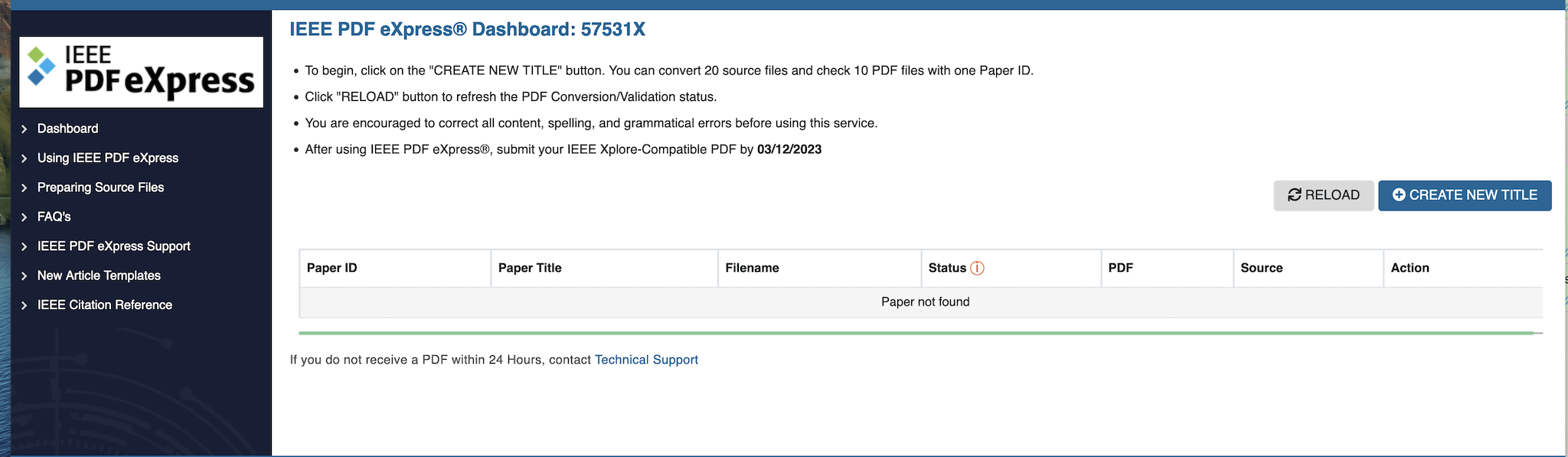
If the conversion of the file to a PDF complaint IEEE Xplore file is successfully created, the message is SUCCESS - File has been converted successfully Click on OK
If an error occurs (see Status), it will be reported:
- Manual Request: File Type Not Automated - conversion will be performed next business day
- Error = Please check your email for additional information
- Upload Incomplete = Click on the "Try Again" link to complete the upload of the file
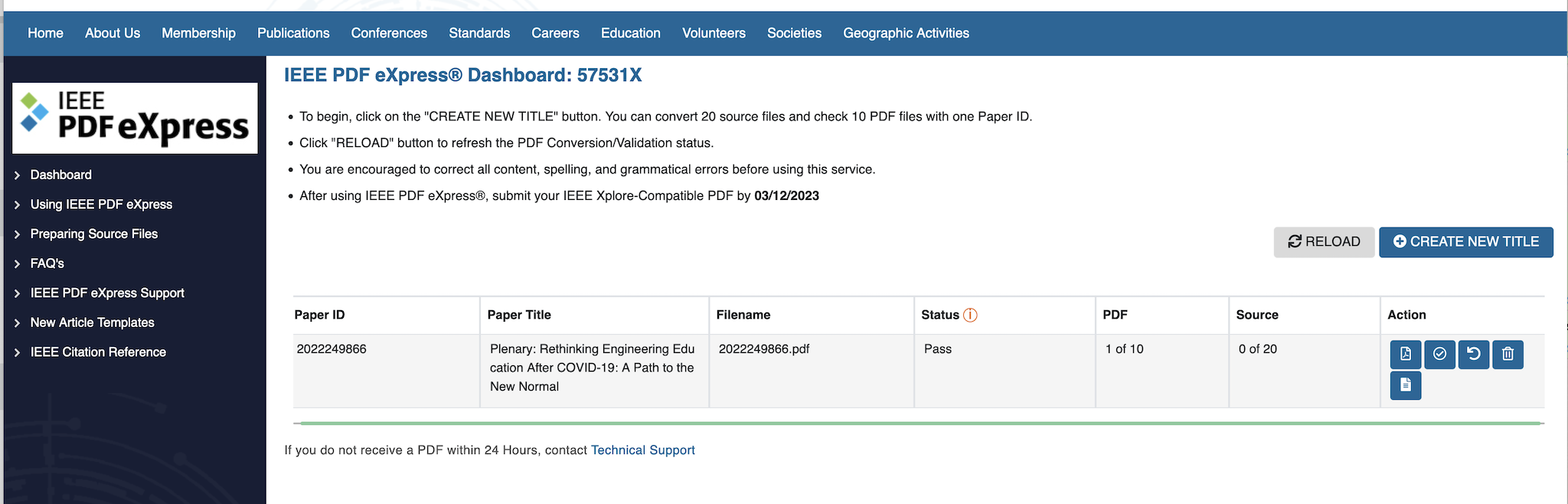
If the PDF file was created successfully, it shows the ID of the created PDF file, the title of the paper you entered and the Status = Pass.
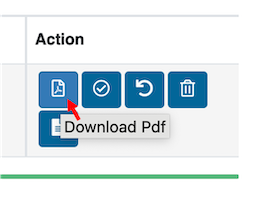
At the end of the line, you will find icons. The first icon allows you to download the file that needs to be uploaded as your final paper on EDUNINE2026 submission system. Carefully review the file to ensure it displays exactly as intended, then upload this file as the final PDF for your submission.
Step 7: Complete and Sign the Copyright Form

After submitting the final version of your paper, you are also required to complete the IEEE Copyright Form. Please note that IEEE no longer accepts digitized or PDF/Word versions of this form. It must be submitted online through the designated platform.
Access the IEEE Copyright site
Please note that access to complete and submit the IEEE Copyright Form will be available after the Peer-Review Notification date. The conference has to await for the official access link and updated guidelines from IEEE. We will share all necessary information with authors as soon as it becomesavailable. Thank you for your understanding.
After submission, IEEE will send you an e-mail with a copy copyrighttransfer agreement of the paper for you and your co-authors. For more information on this process, please refer to the IEEE Electronic Copyright Form information page.
Please DO NOT send that copy to EDUNINE by email; it is intended for the authors' records only.
Step 8: Upload the Final Paper as an IEEE Xplore®-Compliant PDF to EasyChair
This is a brief summary of all the recommendations from the previous steps to guide you in submitting your final paper successfully.
Please upload the PDF generated by PDFeXpress for a second review by a Technical Program Committee member. Papers may require multiple reviews. To allow time for revisions, submit your final paper as early as possible before the deadline. The last review will occur after the deadline (refer to the Timeline). Failure to meet editorial requirements may result in rejection by IEEE Xplore®, delaying the publication of proceedings and affecting all authors.
To upload your final paper to EasyChair ensure your file is PDFeXpress-compatible with IEEE Xplore®. If you encounter errors, contact us at edunine@edunine.eu with the information to identify your paper in our SUBMISSION SYSTEM and the error details. Please DO NOT email the file, as we cannot upload or update submissions due to personal data protection laws. You may upload revised versions as needed, but always regenerate the PDF using PDFeXpress after any changes.
You can visit the conference EasyChair page at the following link: EDUNINE2026 EasyChair
Step 9: Final Review and Submission Confirmation
Each accepted paper must be presented at the conference by one of its authors. At least one author of an accepted paper is required to register for the conference, pay the registration fee, and present the paper during the event. This is a prerequisite for the paper to be included in the conference proceedings and submitted to the IEEE Xplore® digital library. To complete your registration, please visit the Fees and Registration page on this website.
IEEE Non-Presented Paper Policy ("No-Show Policy"): Papers not presented by their authors during the conference may be removed from IEEE Xplore® and excluded from distribution (publication) following the event.
Final Paper Review Notifications
Following each submission of your final paper, you'll receive a summary via email detailing the review process conducted in line with the Final Paper Guidelines. This review will ensure compliance with quality standards for content, English, and format, as well as a proper PDF generation through PDFeXpress, and successful completion of the copyright transfer. Prioritize the originality and plagiarism-free nature of your paper by utilizing a plagiarism checker. Once the copyright transfer is finalized and the paper clears all checks, it undergoes evaluation by IEEE CrossCheck. Utilize the opportunity for multiple revisions, addressing any requested corrections before resubmitting your final paper by the deadline to prevent rejection. Ensure to review the requirements before each submission on this link.